1 billion rows challenge
08/07/2024
There was a challenge posted for processing 1 billion rows of data. It originally mentioned in a blog post by a software engineer, and shortly after it became popular.
The original challenge was for Java, and there were some very impressive solutions that I will not come close to here.
After some thinking I decided to give it a shot as a fun project. I don't think I am a incredible Python programmer by any means, but let's give it a rip and learn something in the meantime!
Context
The input consists of 1 billion rows of data, each row is a string that has a city name, and a temperature reading:Johannesburg;23New York;12London;15....
- No external libraries
- Implementation is in a single source file
- Computation happens at runtime
- For every unique city in the data, print the mean, max, and min of temperature readings
Time to work
My initial thoughts were going to use a dictionary to store the data since the lookups are O(1). To start simple, I just ran a for loop for every row and stored the cities in the dictionary. This was running suprisingly "fast" off the bat (a little over 1 million rows a second), but still took several minutes to finish.
Obviously, this approach is not optimal.
My next thoughts are to read the rows with multiple threads so we can take advantage of concurrent operations. This can significantly improve the performance as multiple threads run concurrently across the data.
Despite Python providing athreading module, Python has a GIL (global interpreter lock) that prevents multiple threads from executing code in parallel. That defeats the idea of true parallel code execution so we will have to use the multiprocessing module instead for true parallel code execution at the CPU core level.The question is, how do we calculate the mean, min, and max of all stations if we use seperate cores to read the data? This is a significant question because code is sequential in terms of execution order within 1 CPU core. When we introduce multiprocessing, we have to think about the problem differently, and try to split it up such that multiple cores can take full advantage of working alongside eachother without requiring any synchronization.
This is a diagram of the approach I took:
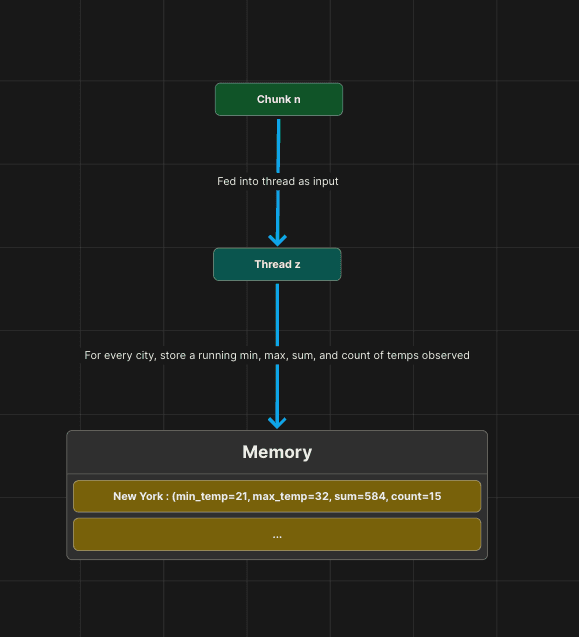
So, why does this work? This works because each CPU core is processing and storing into memory what it has observed. You can think of the input as a continous stream of data. The cores will run in parallel and process the data, doing essential calculations optimally. They do not rely on eachother as they run through the file performing these calculations. The calculations are also not what our final output will be, because it not possible to output the mean, min, and max of the stations in this manner without subjecting to a single core approach. Instead, what we do is store the local minimum, local maximum, the running count of stations observed by the core, and the sum of the temperatures observed by the core.
The idea is that when the cores finish processing the chunks, we will merge the data the cores have gathered, and perform our final calculations for the output.
In order to achieve this, the cores need to process their own allocated sets of the data. To preserve memory, I also limited the amount of how much cores can read to 1 gigabyte of the file at a time.
Below is a diagram of the process:
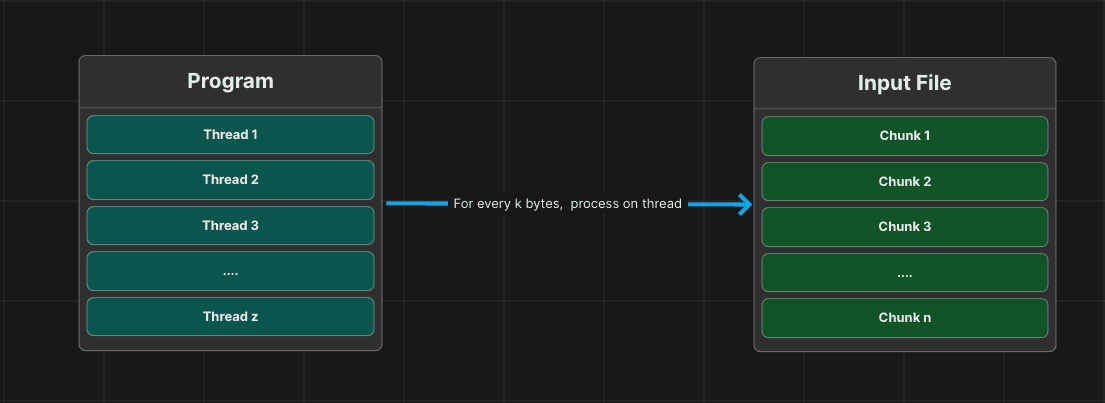
For reference, the total file size of the input file was 10 gigabytes.
I started with k=1024 (1 gigabyte), and the results were not impressive:
Obviously, this is a massive improvement from the initial several minute run. I started looking at the surrounding code to ensure I wasn't doing any unnecessary work.
But, I couldn't find much improvement, so then I started experimenting.
I lowered the k value to 512 megabytes, and the results were:
It seems like this small change had a 22% time improvement.
It seems that there is a diminishing return on the amount of data that a core processes. The more data a core processes in this instance, the more overhead (outside of calculations obviously) occur. An example of this is reading the chunk of data. In Python, this overhead is abstracted away tremendously as Python is a fairly high-level language. Also, the core will be busy doing more work, and the Python multiprocessing pool will have to wait longer for cores to finish before tackling more chunks.
Lets experiment some more, and take k down even lower. This time let's take it down to 100 megabytes.
It seems like our hypothesis was correct. The smaller the chunk size is, the more performant the operations are, in this case. We shouldn't go too small however, because there's also a diminishing return on the amount of chunks we have to process. If k is too small, the multiprocessing pool will have to wait longer for the max amount of cores to finish processing their chunk before more chunks can be proccessed. After all, a processor does not have infinite cores.
Let's do a couple of very quick experiments to see how far we can go.
Since I am running this on a 12 core processor, breaking down the chunks into smaller pieces allows the processor to take full advantage of the cores and the multiprocessing pool. This is why we see an improvement in time as we decrease the chunk size. But, we cannot decrease the chunk size forever. You want the cores to stay as busy as possible while doing the most amount of work.
I tried some cheap tricks to get this time down, but I couldn't make a notable difference. The original challenge didn't technically state whether the code had to be compiled or not, so compiling this Python code could yield a better result since Python is a run-time interpreted language and that adds sizable overhead. I didn't try this because it's slightly in the gray area of the rules and I want to challenge myself with the most natural Python environment.
Conclusion
This was a lot of fun, and I encourage any software developer to take a crack at it. It challenges you further and tests your abilities to overcome obstacles in a creative way.
Thank you for reading!